The seller just sent over 20 photos of the house. They look great, apart from one problem: every single one carries the previous agency's logo across the middle. Or maybe you shot the property yourself on an Android phone, and now there's a yellow date, time and street address burned into the corner of each frame.
To remove watermarks from real estate photos, upload them to Dewatermark for semi-transparent logos and text watermarks, and use Dewatermark's Text Remover for solid overlays like phone numbers, captions and date stamps.** Both tools detect the marks automatically, erase them, and rebuild the floor, wall or sky underneath, so the photo is ready to list in a few seconds.
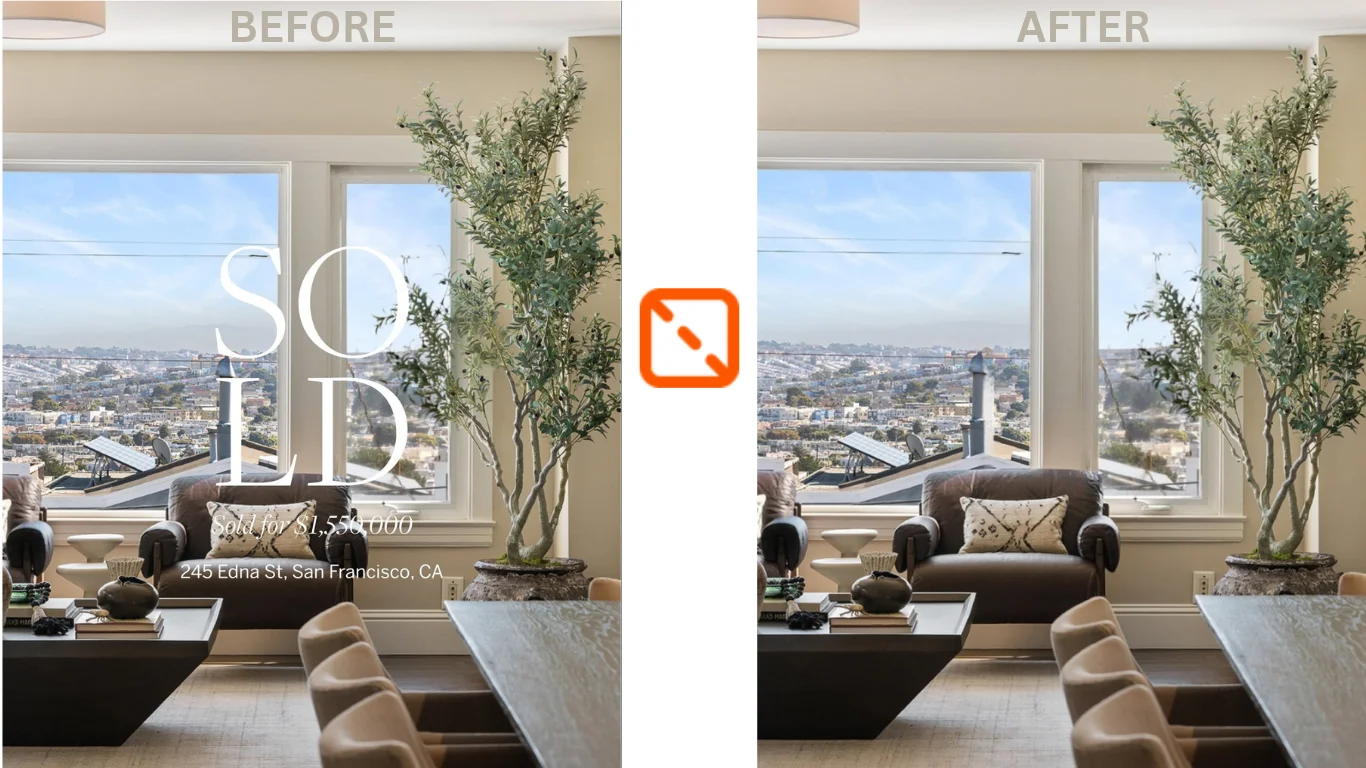
Common Watermarks on Real Estate Photos (and Why Agents Remove Them)
Property photos usually pick up one of three kinds of marks, and each one causes a different headache.
- Semi-transparent logos and text watermarks. These come from builders, developers, previous listing agents or the photographer. If you post them as-is, buyers may call the name on the photo instead of you, and the listing looks recycled.
- Overlaid contact details and promo text. Phone numbers, agent names, "FOR SALE" banners or an old asking price. They go out of date the moment the listing changes hands or the price drops.
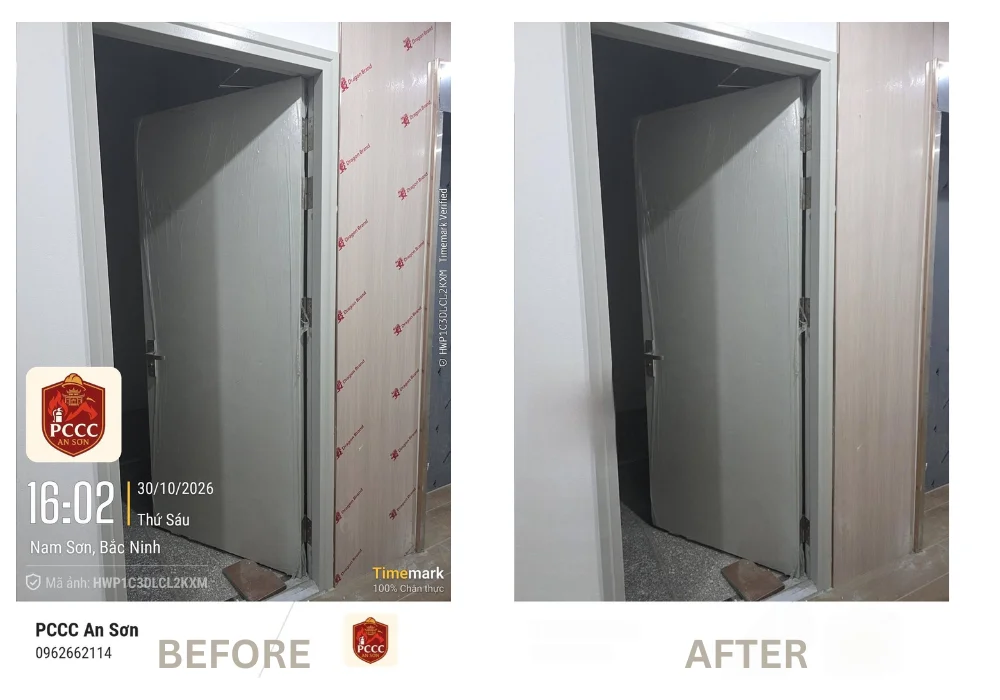
- Date, time and GPS stamps from phone cameras. Many Android camera settings and apps like Timestamp Camera or GPS Map Camera print the date, coordinates and even the full address onto the image. That clutters the shot, makes a fresh listing look months old, and can reveal more about the property's location than you want to share.
The first group is best handled by a watermark remover. The second and third groups are solid text, so a text remover does a cleaner job. Here's how to use each.

How to Remove Watermarks and Logos from Real Estate Photos
Use Dewatermark's Watermark Remover when the mark is a faded logo, a see-through brand name, or a repeated text pattern laid over the photo. The AI finds the watermark on its own, removes it, and fills the area with matching texture, whether that's hardwood flooring, tiled walls, a window frame or open sky.
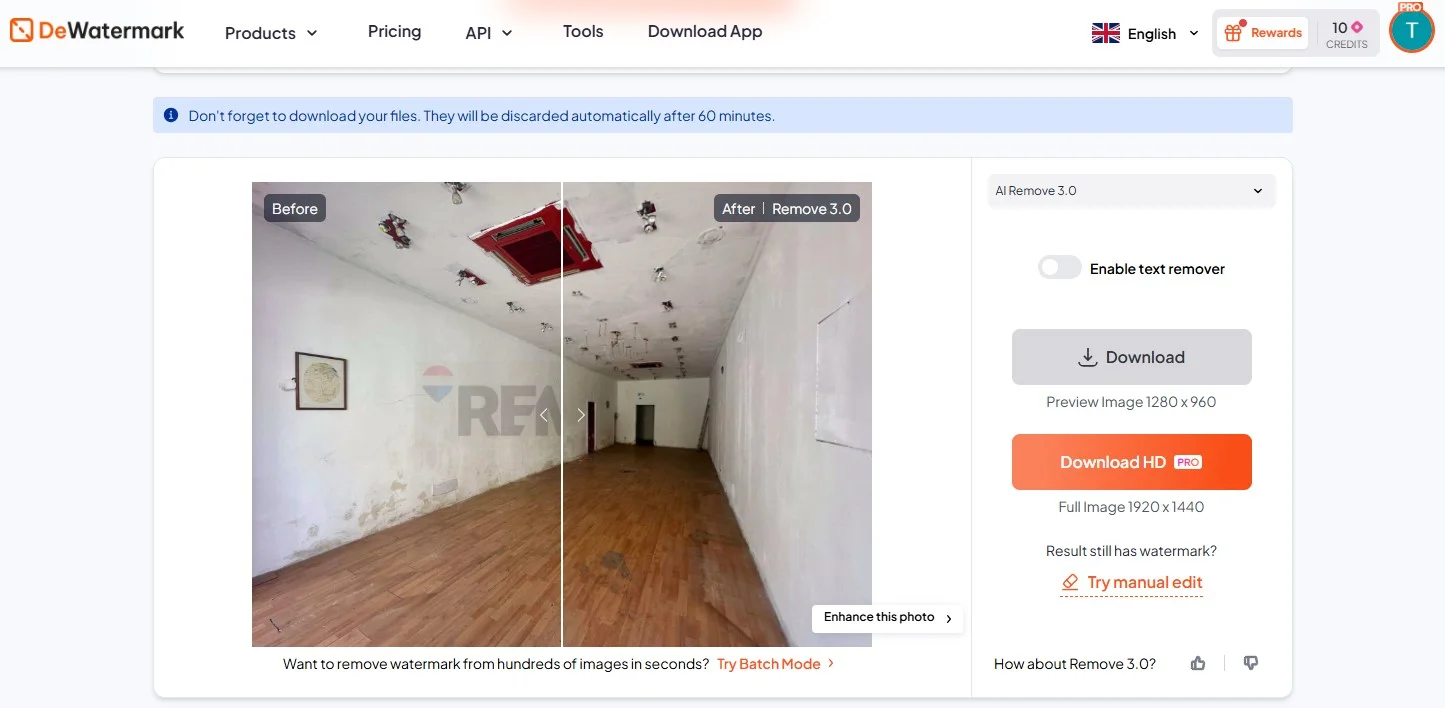
Step 1: Upload your listing photo
Go to dewatermark.ai and drag your photo onto the upload box, or click to choose a file. JPG, PNG and WEBP all work. You can start without creating an account.
Step 2: Let the AI remove the watermark
Dewatermark scans the image, detects the watermark and erases it automatically. There's nothing to select or mask. Most photos are done in a few seconds.
Step 3: Brush over anything that's left
If a faint edge of the logo remains, switch to the manual brush, paint over that spot, and let the AI clean it again. This is handy when a watermark crosses busy detail like curtains, plants or patterned rugs.
Step 4: Download the clean photo
Check the result at full size, then hit Download. Your photo is ready for the MLS, your website or social media.
Tip: For watermarks sitting on top of complex detail, try the Pro model. It costs 3 credits per image instead of 1, but it does a noticeably better job of rebuilding fine patterns and textures.
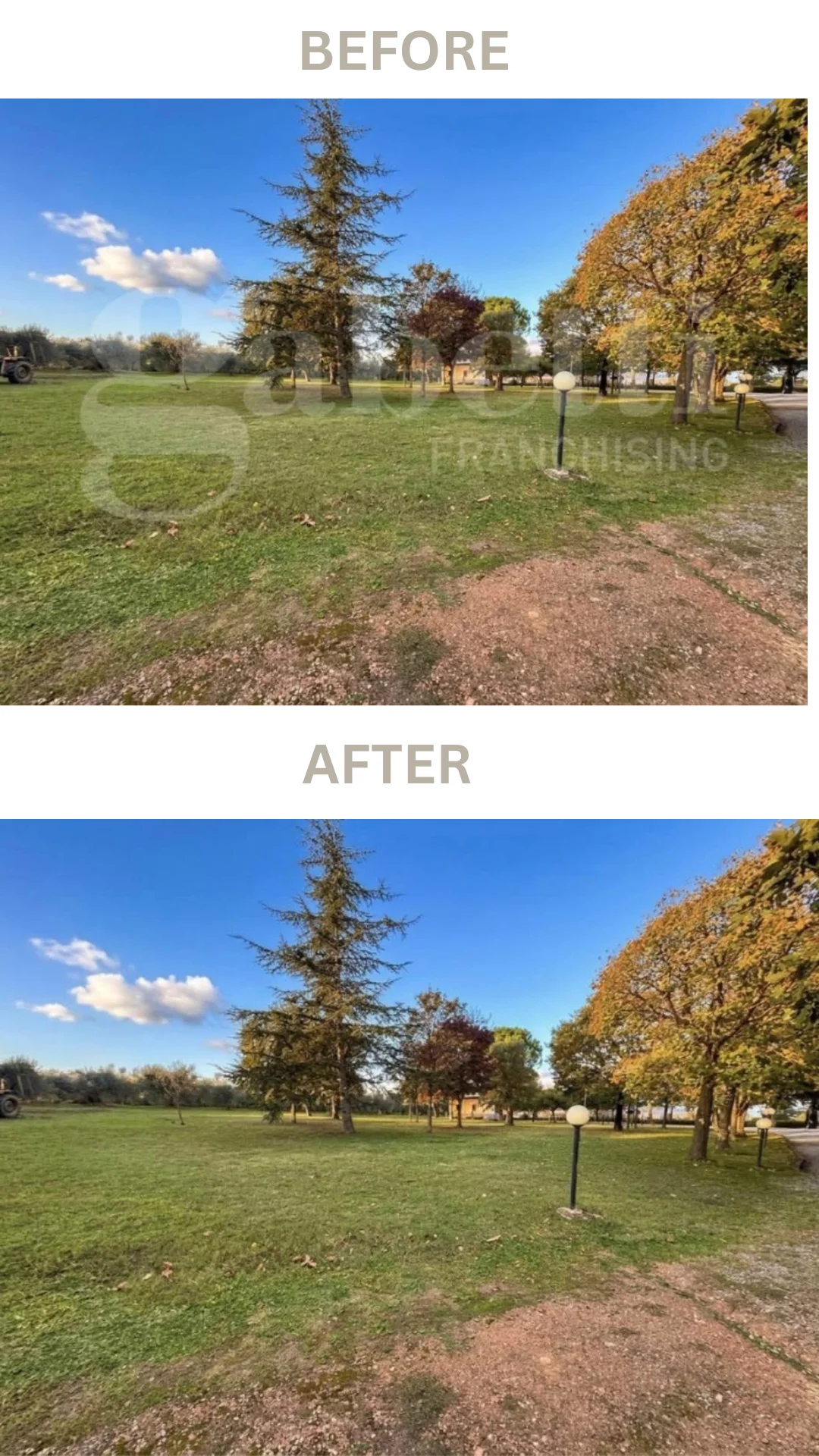
How to Remove Text, Phone Numbers and Timestamps from Property Photos
Use Dewatermark's Text Remover when the mark is solid, readable text printed on the photo: phone numbers, agent names, captions, prices, or a date and location stamp. It picks out the text layer specifically, so it can clear lettering without smudging the surroundings.

Step 1: Open Text Remover and upload the photo
Go to dewatermark.ai/text-remover and upload the image.
Step 2: Let the AI detect and erase the text
Text Remover finds every block of text on the photo and removes it in one pass, rebuilding the background behind each letter.
Step 3: Clean up any text the AI missed
If a small line of text survives, for example a tiny URL in the corner, brush over it and run the removal again.
Step 4: Download
Download the cleaned image and you're done.
A faster method is, right from the remove watermark editor, you additionally enable the remove text button, like the following image. Then AI automatically detect text left and removes
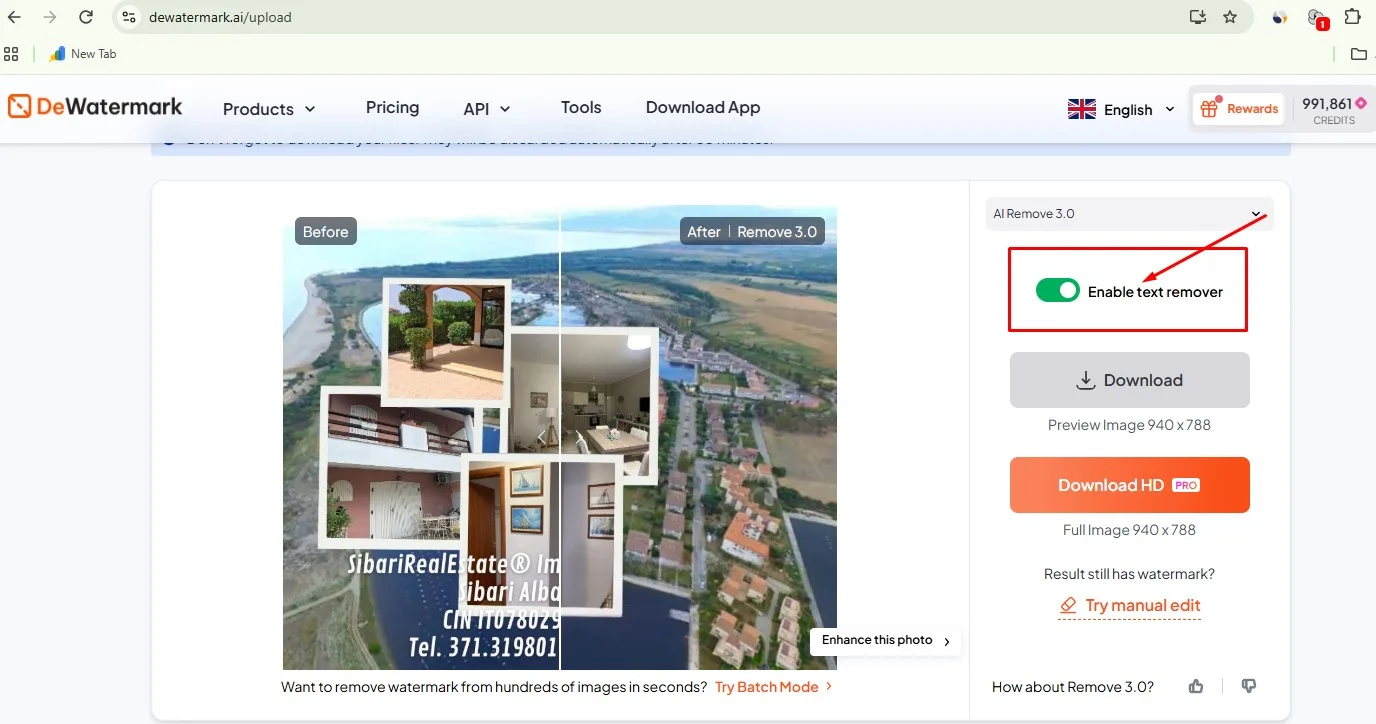
Removing date and location stamps from Android photos
To remove a timestamp from a photo, upload it to Dewatermark's Text Remover; it treats the date, time, coordinates and address printed by your phone camera as text and erases them, leaving the rest of the photo untouched. The steps are the same as above. The stamp usually sits in a corner, so it's one of the easiest jobs for the tool.
Tip: Turn off the stamp before your next shoot
Save yourself the extra step next time:
- Samsung: open Camera → Settings (gear icon) → turn off Watermark.
- Xiaomi / Redmi / POCO: open Camera → Settings → Watermark → turn off the device and timestamp watermark.
- Timestamp or GPS camera apps: open the app's settings and disable the date, time and location overlay, or simply use your phone's default camera for listing shoots.
Menu names vary a little between phone models and software versions, but the option is almost always labeled "Watermark" or "Timestamp."
One more thing worth knowing: erasing the visible stamp doesn't remove the location data stored inside the file (EXIF/GPS metadata). If you don't want to share the exact coordinates of a property, also turn off Location tags in your camera settings before you shoot.
Logo and Text on the Same Photo? Use Both Tools
Plenty of real estate photos carry a watermark and text at the same time: a faded agency logo in the middle, plus a phone number or timestamp along the edge. One tool alone may leave part of the job undone.
The fastest way to clean these:
- Run the photo through Watermark Remover first to clear the semi-transparent logo.
- Enable text remover to wipe the phone number, caption or date stamp.
- Use the manual brush to remove hard marks, icons, and logos left.
- Download the final, fully clean photo.
Clean an Entire Listing Album at Once
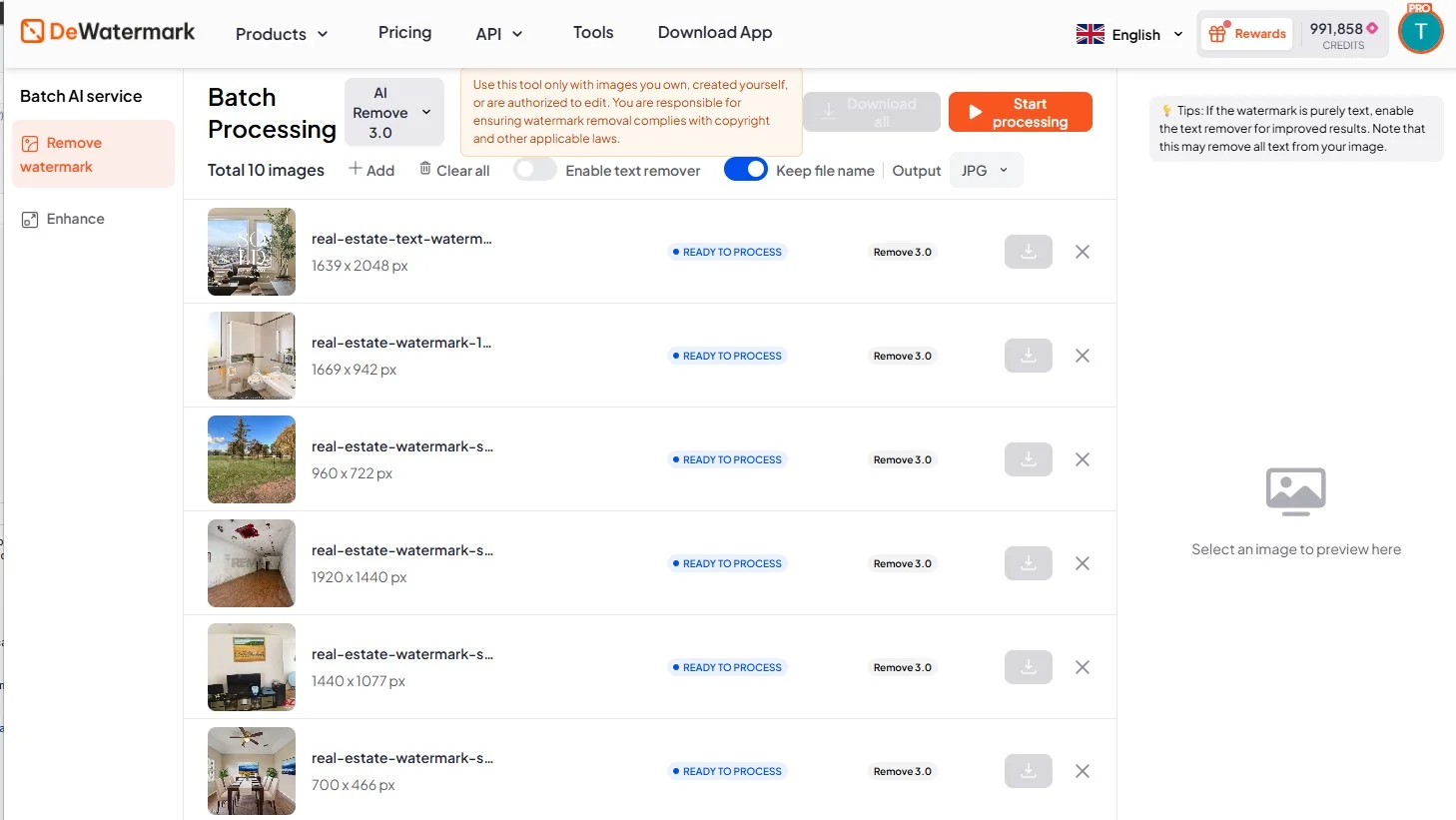
A single listing can easily have 15 to 30 photos, and doing them one by one gets old fast. When the whole set carries the same watermark, use Batch Image Watermark Remover to upload the album, process every image together, and download them in one go.
If some of the photos came in blurry or heavily compressed, which is common with shots sent through messaging apps, finish with Batch Photo Enhancer to sharpen them before they go live.
Tips for Professional-Looking Listing Photos After Cleanup
- Start with the highest-quality file you can get. Ask the seller or photographer for the original, not a screenshot or a forwarded copy.
- Use the Pro model for tricky areas. Watermarks over windows, plants or patterned fabric come out cleaner.
- Enhance before you post. A quick pass through AI Image Enhancer helps photos stand out on listing portals.
- Brand lightly. If you add your own watermark, keep it small and tucked in a corner rather than across the middle of the room.
- Got a property tour video or a PDF brochure too? Video Watermark Remover and PDF Watermark Remover work the same way.
A Quick Note on Photo Rights
Removing a watermark doesn't change who owns the photo. These tools are meant for images you have the right to use: photos you took yourself, photos a seller, builder or developer gave you to market their property, or images supplied to you for a listing you're handling. Taking another agent's photos from Zillow, the MLS or a listing portal and stripping their branding to repost them is a copyright problem and can get your listing reported or taken down. When in doubt, ask the owner for an unwatermarked copy first.
How Much Does Dewatermark Cost?
Dewatermark gives every user 10 free credits a day, and you can earn up to 20 more credits per day through daily check-ins. One credit cleans one photo with the Standard model, and the Pro model uses 3 credits per photo. That covers occasional listings for free, while busy agents and brokerages can pick a monthly plan on the pricing page.
The Short Version
Faded logos and see-through watermarks go to Watermark Remover. Phone numbers, captions and date or location stamps go to Text Remover. Photos with both? Run them through one, then the other. Upload, let the AI do the cleanup, and download listing photos that look like they were shot just for you.
Remove a watermark from your listing photo → | Remove text from your photo →