
Google Images has become one of the fastest ways to find visuals for blogs, websites, social media, and marketing campaigns. With just a few clicks, millions of images are available, which makes it easy to assume they’re free to use.
This article breaks down how Google Images actually works, why most images are protected by copyright, and the practical steps you can take to use images legally and responsibly. Whether you’re a blogger, marketer, or business owner, these tips will help you avoid costly mistakes.
Google images copyright and ownership
Google Images is a search engine that indexes images found across the web and shows them as search results. When you click on an image in Google Images, you are viewing a copy or preview of content that is hosted on someone else’s website, not content owned or licensed by Google.




A common misconception online is that if an image is easy to find, it must be free to use. In reality, copyright protection begins automatically the moment an image is created. The photographer or designer does not need to add a watermark, copyright symbol, or credit line for the image to be legally protected.
This means that most images you see on websites, blogs, and social media are copyrighted, even if they appear unmarked or freely accessible. Just because an image shows up in Google Images does not mean Google owns it or that you are allowed to reuse it.
Reusing images without permission can carry real consequences. Copyright owners may issue DMCA takedown notices, request removal from platforms like Google, YouTube, or Shopify, or even pursue legal claims in serious cases. For businesses and creators, this can lead to lost content, damaged credibility, or account penalties.
Learn more:
How to use Google images legally
Using Google Images legally starts with understanding that Google is a search engine, not a content library. Now, let’s deep dive into some inside tips to utilize Google Images
Check image usage rights on Google Images
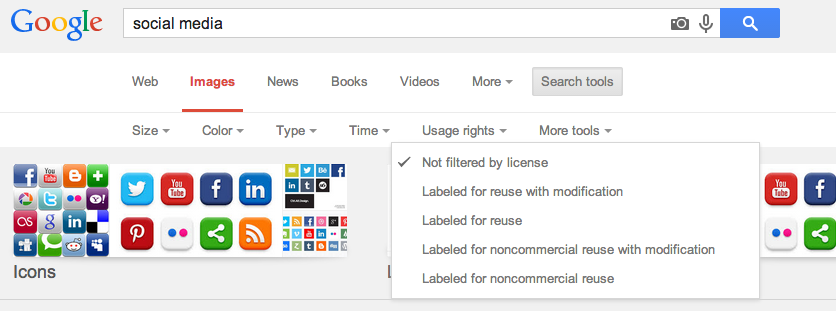
When searching on Google Images, click “Tools” below the search bar, then look for the “Usage rights” filter. This allows you to narrow results to images labeled for reuse, commercial use, or modification. These labels are based on information provided by the image’s source, not Google itself, so accuracy can vary.
To be safe, always click through to the original website hosting the image. Look for licensing information, copyright notices, or terms of use on that page. Stock photo sites, blogs, and portfolios often clearly state whether an image can be reused and under what conditions.
If the image originates from a platform that offers Creative Commons licenses, verify which license applies and whether attribution or usage restrictions are required. When no licensing details are visible, assume the image is fully copyrighted and avoid using it without permission.
Google Images provides the tool to help you filter results, but these tools should be treated as a starting point, not a legal guarantee.
Legal ways to use Google images
You can use images released under Creative Commons licenses or other commercial-friendly licenses. However, each license type comes with specific conditions. For example, CC BY images require proper attribution, while others may restrict commercial use or modifications. You can also safely use public domain (CC0) images, which come with no known copyright restrictions. These images can be used, modified, and distributed freely, even for commercial purposes.
When the licensing terms are unclear, the most reliable solution is to contact the copyright holder directly and request permission. This may take more time, but it eliminates legal uncertainty.
You can also check the licensed stock photo platforms such as Shutterstock, Adobe Stock, and iStock, which provide professionally created images with clear commercial licenses. These services reduce legal risk and are ideal for marketing, ecommerce, and brand-focused projects, though they usually involve a cost.
Another option is public domain and open-license libraries like Unsplash, Pixabay, and Wikimedia Commons. These platforms offer free images with broad usage rights, making them suitable for blogs, presentations, and social media. However, image uniqueness may be limited due to widespread use.
You can also create your own visuals by taking photos, designing graphics, or generating original content in-house. This ensures full ownership and eliminates licensing concerns, though it requires time and resources. Some businesses choose to commission original work from photographers or designers. While this is the most expensive option, it provides exclusive assets tailored to your brand.
Common myths & misunderstandings about using Google Images
One common myth is that images without watermarks are free to use. In reality, most copyrighted images are shared online without visible watermarks. The absence of a watermark does not mean the creator has waived their rights.
Some users believe that embedding an image instead of uploading it avoids legal risk. While embedding may reduce certain hosting issues, it does not automatically eliminate copyright concerns, especially if the embedded image is used in a commercial or promotional context.
A particularly widespread misunderstanding is that crediting the creator makes any use legal. Attribution is only meaningful when the license explicitly allows reuse with credit, such as some Creative Commons licenses. Giving credit does not override copyright restrictions on its own.
The safest approach is to verify image rights before using them, rely on clearly licensed or public-domain sources, and understand the limitations of concepts like attribution and fair use. By taking a few extra steps to confirm permissions, creators can avoid copyright issues while still accessing high-quality visuals for their projects. Responsible image use not only protects you legally but also respects the work of original creators.